Optimize Workforce Efficiency with MSF Labor Management Module
Seamless Workforce Scheduling, Higher Productivity, and Reduced Costs
Managing labor efficiently is critical to maintaining a well-balanced, productive, and cost-effective manufacturing environment. The MSF Labor Management Module is designed to streamline workforce planning, automate scheduling, and optimize labor allocation all while ensuring employee satisfaction and operational efficiency.
Whether used as a standalone solution or integrated with MSF’s Advanced Planning & Scheduling (APS), this module empowers manufacturers with smart automation, real-time data, and AI-driven workforce optimization.
How MSF’s Labor Management Module Enhances Workforce Planning
1. Automated Scheduling for Maximum Efficiency
No more time-consuming manual scheduling! Our AI-driven automated labor scheduling takes into account employee availability and shift preferences. Skill matrix mapping to ensure the right people are assigned to the right jobs.Ergonomics and workload balancing to prevent overburdening employees.Optimal staffing levels to eliminate scheduling conflicts and improve workflow continuity.
Result? Less time spent on workforce planning, fewer errors, and smoother production operations.
2. Skill Matrix & Intelligent Workforce Allocation
Matching the right employees to the right workstations is key to maintaining high-quality output and efficient operations.
Skill-Based Assignments: Easily assign workers based on their qualifications and competencies.
Individual & Group Scheduling: Schedule employees individually or in groups to maximize efficiency.
Machine Setup Allocation: Ensure that only qualified workers handle machine setups.
With smart workforce planning, you get better performance, lower downtime, and higher job satisfaction.
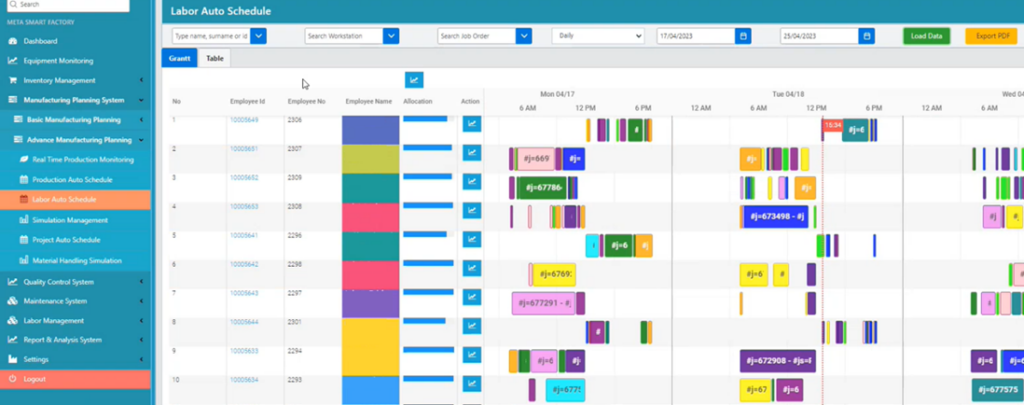
3. Real-Time Workforce Visualization with Gantt Charts
Gain complete visibility into your labor schedule with an intuitive Gantt diagram visualization.
Filter schedules by:
- Workstations, operators, and groups.
- Shift start and finish times.
- Workforce allocation percentage.
This real-time, interactive view helps managers quickly adjust schedules, improve labor distribution, and respond effectively to production changes or crises.
4. Flexible Workforce Structuring & Shift Management
Manufacturers operate in dynamic environments, requiring flexible scheduling to adapt to production needs.
General Grouping: Define work groups based on machine assignments.
Shift Grouping: Assign employees to rotate shifts (e.g., Group A for the first shift, Group B for the second shift).
Dummy Employee Assignment: Plan capacity by simulating workforce requirements.
Work Under Supervision Option: Define roles for employees needing supervision during certain tasks.
This structured approach minimizes workforce-related disruptions and ensures smooth production execution.
Why Choose MSF Labor Scheduling Software?
Real-Time Integration with APS
- Adapts instantly to production changes, order modifications, and crisis scenarios.
Cost Reduction & Increased Operational Efficiency
- Reduces labor costs and optimizes workforce utilization.
Fully Automated Workforce Scheduling
- Eliminates manual workforce planning for greater accuracy and speed.
Seamless ERP Integration
- Syncs with work orders, worker data, and skill sets for better coordination.
Cross-Platform Data Exchange
- Connects with external workforce management solutions for attendance tracking, shift logging, and compliance.
Customizable for Any Manufacturing Environment
- Fully configurable with group types, scheduling rules, skill matrix settings, and exceptions.
-
Enhanced Visibility & Control
Gantt charts, real-time data, and intelligent scheduling tools provide full visibility over workforce planning.